

A strong flight page needs to do more than display a fare. It should provide a complete picture of the route by covering the information travelers commonly use to understand and compare their options.
That includes whether prices are one-way or round-trip, the availability of nonstop service, typical flight duration, lower-cost travel periods, the airports used, and—when connections are involved—the layover location and duration. Booking insights, such as the cheapest month or a recommended booking window, can add further context when the airline has reliable data to support them.
Achieving that level of completeness is difficult for airlines. The information needed to build a comprehensive flight page often comes from different systems: fare feeds, schedules, route data, airport information, historical pricing, product content, and airline policies. These inputs change at different rates and may not be available consistently for every route, market, or language. The challenge is not simply publishing more content. It is about bringing the right information together, keeping it accurate, and presenting it in a useful, accessible format at scale.
Our research on 376 city-to-city flight prompts showed the consequence. Airlines appeared frequently in ChatGPT’s flight answers, but 74.6% of airline mentions were not linked to the airline’s own website. The mismatch was especially high for layovers and connections, fare pricing, flight frequency, and flight duration – exactly the subjects a strong flight page should cover.
Our previous articles examined two parts of the solution separately: full-spectrum fare coverage and accurate Dynamic FAQs at scale. In this article, we will cover the airTRFX City-to-City page blueprint, which brings those ideas together into one content architecture.
The blueprint is not a rigid template. Module order, presentation, and selection should vary by airline, market, route, and available data. It is better understood as a content model: a set of layers that work together to make a flight page comprehensive, specific, and useful. To see how the layers can work together as a complete page, explore the airTRFX City-to-City demo page.
AI-Ready Does Not Mean AI-Written
The phrase “AI-ready” can make the exercise sound more exotic than it is.
Google’s current guidance for generative AI search emphasizes the same foundations as traditional SEO: useful, people-first content; a clear technical structure; crawlability; and good page experience. Google specifically recommends valuable, non-commodity information rather than large volumes of low-value variations created primarily to influence rankings or AI responses.
For airlines, that distinction is important. A page is not AI-ready if it repeats the route name too often, adds generic AI-generated destination copy, or inserts an FAQ accordion solely for markup.
It is AI-ready when it becomes a reliable first-party resource for the route.
The City-to-City Anatomy at a Glance
The blueprint can be organized into six content layers.
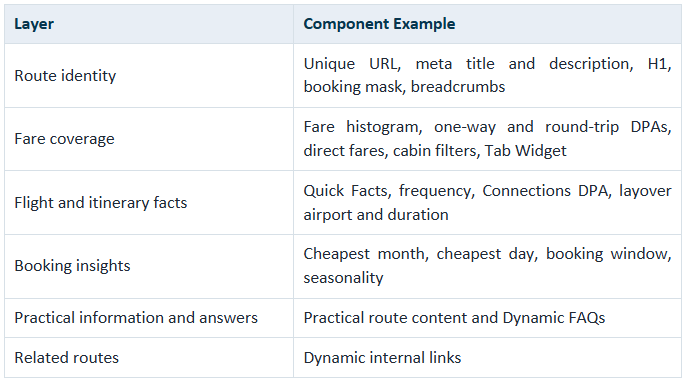
The layers reinforce one another. A lowest fare becomes more useful when the page also shows the travel dates and trip type. A connection price becomes more useful when paired with the stop count, connecting airport, and layover duration. A booking-window fact becomes more useful when an FAQ explains what it means and includes an appropriate caveat.
1. Establish the Route Identity
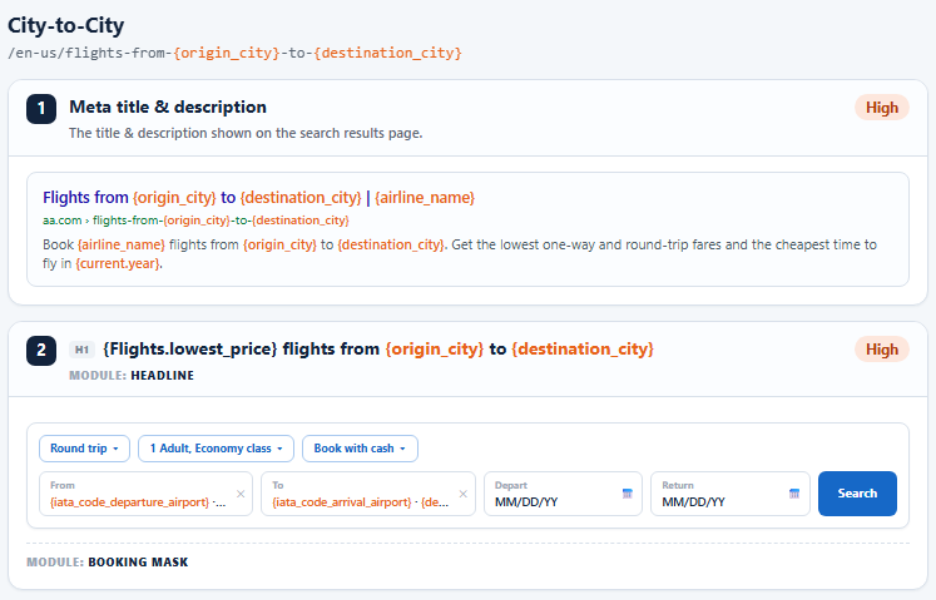
A city-to-city page represents a specific origin-destination pair, so the URL, candidate search title, meta description, H1, and visible booking experience should all agree on that route. The structure should follow a clear pattern:
- A descriptive URL such as /flights-from-[origin]-to-[destination].
- A title that names the origin, destination, and airline.
- A description that summarizes the route’s available fare views and planning value.
- An H1 that identifies the flight pair and, when reliable and approved, can incorporate a current starting fare.
- A booking mask prefilled with the correct origin and destination.
- Breadcrumbs that place the route within the airline’s broader flight-page hierarchy.
2. Build Comprehensive Fare Coverage
A single “from” price does not provide a complete view of the route.
Our fare-coverage framework separates three requirements:
- Retrievability: Is the fare published in a format that can be accessed and understood?
- Breadth: Does the page cover the pricing dimensions travelers need to understand and compare their options?
- Granularity: Does the pricing extend across enough months and dates to support travel planning?
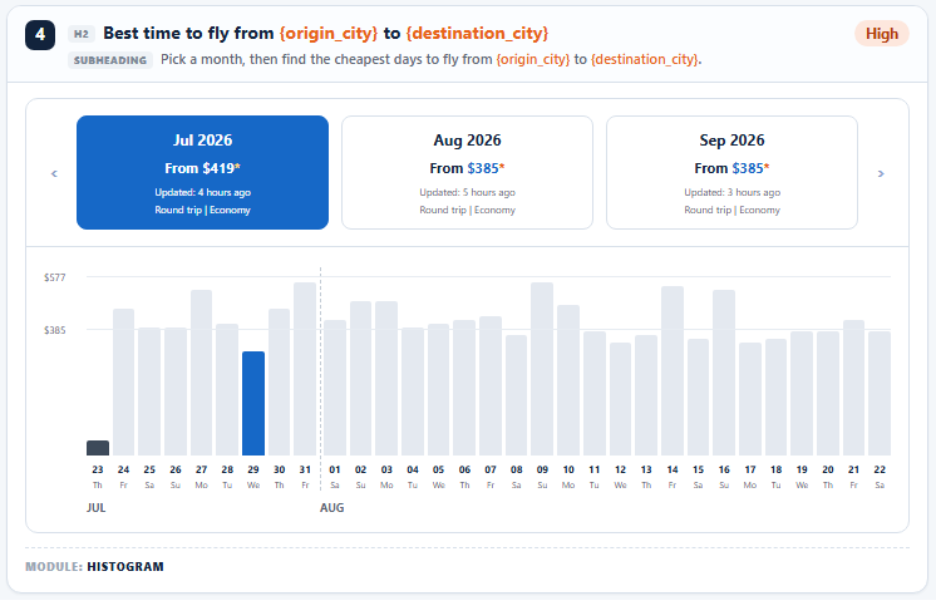
The fare-coverage layer addresses granularity with a fare calendar or histogram. Instead of showing a single undated number, the page can display the lowest available fares by month and day. This helps travelers compare travel periods and gives the page enough pricing depth to support information about lower-cost times to fly.
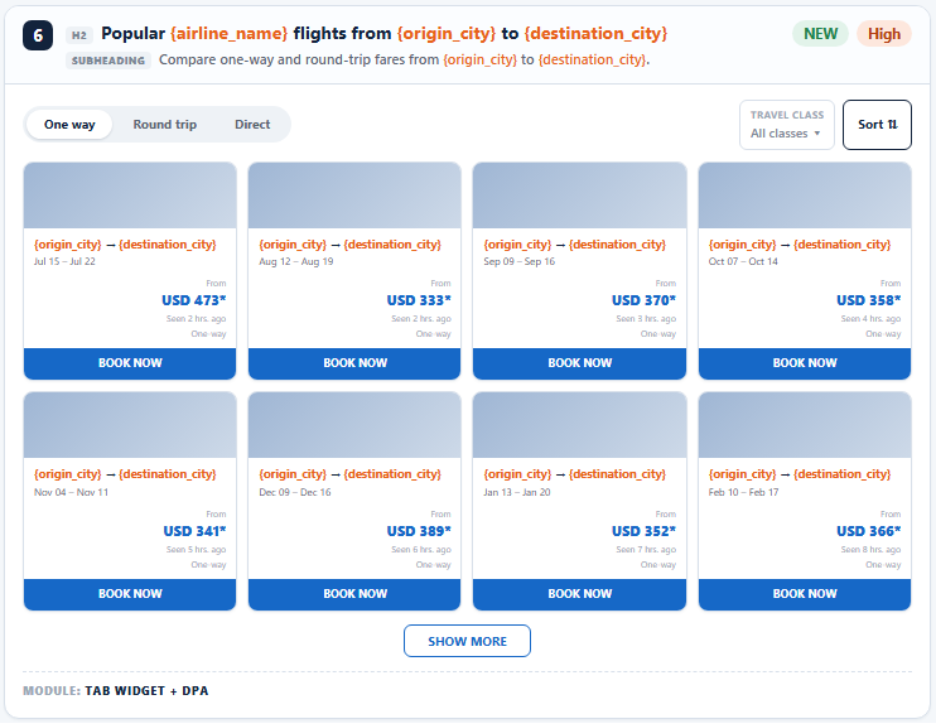
A Tab Widget can also consolidate multiple DPA views into a single organized section. One-way, round-trip, and direct options can share the same visual footprint, with additional filtering for cabin or sort order. The goal is to reduce visual overload without reducing fare coverage.
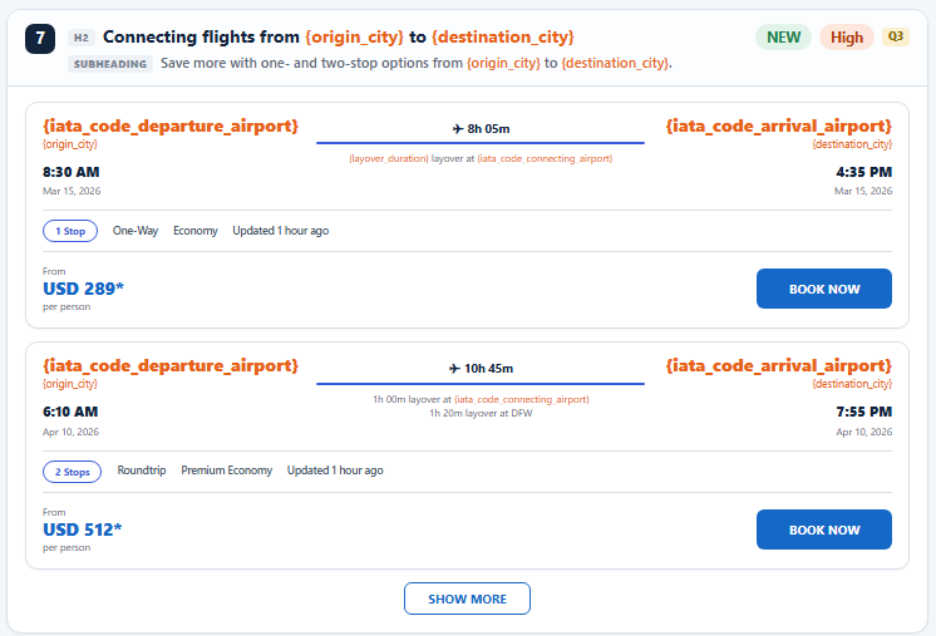
Fare coverage should also account for itineraries that require a connection. The Connections DPA expands the page beyond nonstop options by surfacing relevant one-stop and two-stop fares when the necessary data is available.
Its value extends beyond adding another price. By pairing the fare with details such as the connecting airport, layover duration, total travel time, trip type, and cabin class, the module gives travelers a more complete view of available itineraries.
3. Publish Useful Flight and Itinerary Facts
Pricing provides only one layer of the route information a traveler needs.
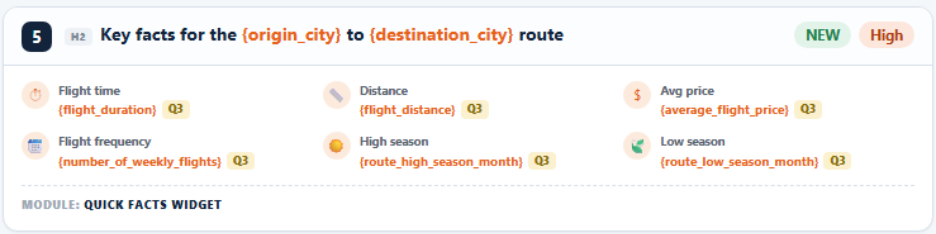
The Quick Facts section adds concise operational information that helps complete the picture. Depending on the airline’s available data, this can include:
- Typical flight duration.
- Route distance.
- Weekly flight frequency.
- Departure and arrival airports.
- Nonstop availability.
- Other dependable route-level facts.
This format separates facts from longer explanatory content. A user can quickly scan the page, while each value remains clearly labeled and attached to the route.
4. Add Booking Insights
A comprehensive flight page should also provide useful context about when to travel and when to book, when the airline has reliable data to support it.
A City-to-City layout should also include route-level historical insights such as:
- The cheapest month to fly.
- The cheapest day to travel or book, depending on the metric.
- A recommended booking window.
- High- and low-season periods.
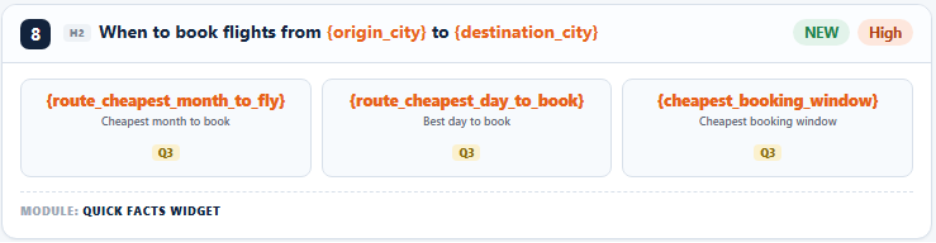
These are not static route attributes. They are derived observations that can change with the market, season, methodology, and available data. The visible insight can remain concise, while nearby supporting content or a Dynamic FAQ explains the caveat.
For example, “Book 40 days before departure” sounds like a guarantee. “Based on recent fare patterns, lower prices on this route have typically appeared around [booking window] before departure” is more accurate and more useful.
5. Provide Practical Information and Direct Answers
Many flight pages become thin immediately after the fare modules end.
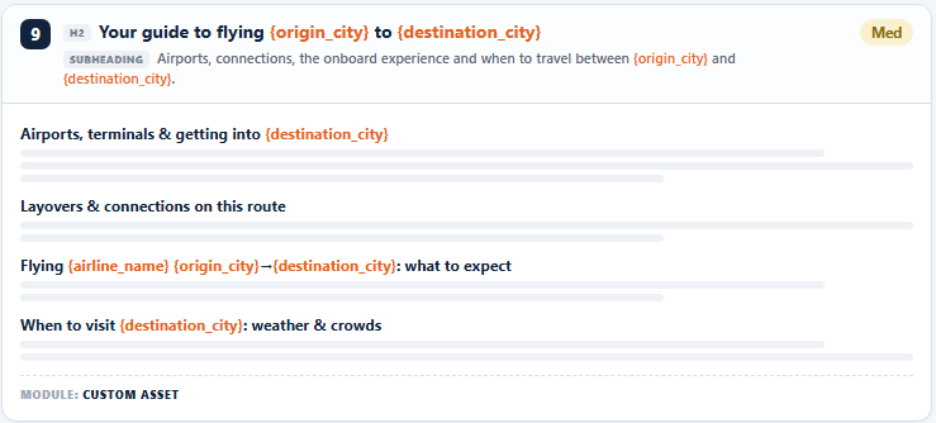
Practical route content prevents that by explaining aspects of the trip that neither prices nor fare cards can convey. For a city-to-city page, useful topics can include:
- Departure and arrival airports, terminals, and ground access.
- Nonstop and connecting patterns.
- What travelers can expect from the airline on the route.
- Aircraft and amenities when the data is dependable.
- Seasonal considerations at the destination.
- Cabin or policy information when it can be governed accurately.
The airline has an advantage here: first-party knowledge of its operations, products, and policies. The content earns its place when it turns that knowledge into a clearer understanding of the trip.
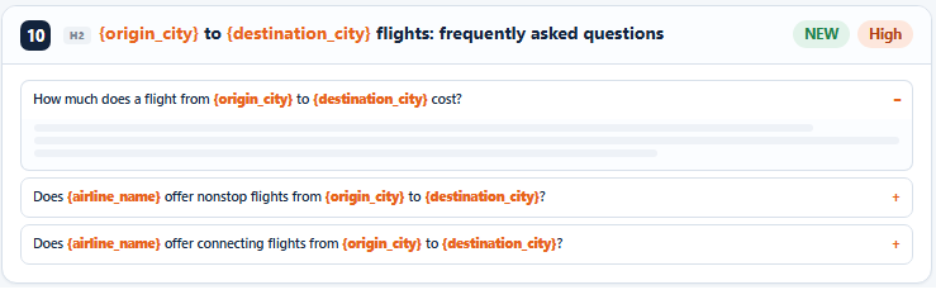
Dynamic FAQs extend this layer by turning governed facts and policies into direct, natural-language answers. For a city-to-city page, relevant questions can include:
- How much do [airline] flights from [origin] to [destination] typically cost?
- Does [airline] offer nonstop flights from [origin] to [destination]?
- What connecting options does [airline] offer from [origin] to [destination]?
- How long is the flight from [origin] to [destination]?
- How many flights does [airline] operate each week from [origin] to [destination]?
- Which airports does [airline] use for this route?
- When is the best time to book flights from [origin] to [destination]?
The question supplies intent and context. The answer combines approved editorial logic, page variables, and updated flight facts. The value is not the accordion or the markup. It is the visible, specific answer. The content still must be relevant, up to date, accurate, and useful to the traveler.
6. Strengthen Route Discovery with Internal Links
City-to-city pages should not be isolated from the airline’s broader route network.
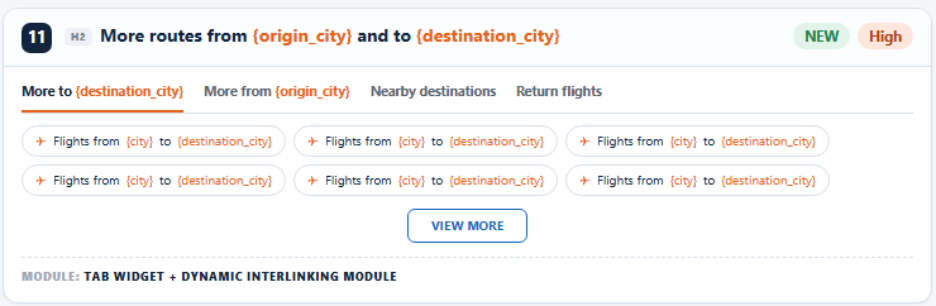
The page should include a dynamic interlinking module organized around four useful paths:
- More routes to the destination.
- More routes from the origin.
- Nearby destinations or airports.
- The return route.
These links help search engines discover valid route pages and understand how origins, destinations, airports, and related itineraries connect within the site. They also reinforce the airline’s route hierarchy while helping travelers continue or adjust their trip planning.
The keyword is related. A large block of indiscriminate links creates noise. The module should prioritize existing routes, match the page’s context, and represent a meaningful relationship.
How airTRFX Operationalizes the Blueprint
Building one complete route page is manageable. Maintaining the same standard across thousands of routes, markets, and languages is the operational challenge.
airTRFX is designed to separate the reusable page system from the values that change by route:
- Page templates establish the hierarchy, headings, and component logic.
- Context variables resolve the airline, origin, destination, airports, market, and language.
- Server-rendered DPAs publish fare views with route and product context. Connections DPA expands the architecture to detailed connecting itineraries when the necessary data is available.
- Histograms add month- and date-level pricing depth.
- The Tab Widget consolidates related fare views without requiring separate long sections.
- Quick Facts surface concise route and booking information.
- Dynamic FAQs turn governed data into complete answers.
- Dynamic interlinking connects the route to relevant alternatives.
This does not mean every page should contain every module. The correct page is the strongest page the airline can support with reliable data.
Conclusion
A single widget, schema type, or content tactic does not define an AI-ready flight page. It is defined by coverage.
A comprehensive flight page should include a clear route identity, fares across relevant dates and trip types, and information on both nonstop and connecting options. It should also include scannable flight and itinerary facts, booking insights, practical route information, direct answers to common questions, and links to related routes. Together, these elements create a coherent and useful resource for the route.
The City-to-City content blueprint brings those layers together into one comprehensive flight page. airTRFX provides a scalable way to operationalize the architecture. Still, the principle is broader than any product: publish the complete evidence a traveler needs, organize it around the route, and make it easy to retrieve.
The accompanying airTRFX City-to-City demo page illustrates how that architecture can work as a complete experience.
AI-Ready Flight Pages: Frequently Asked Questions
An AI-ready flight page provides useful, route-specific information in a clear and accessible structure. It should identify the route, publish relevant fares, explain itinerary options, include dependable flight facts and booking guidance, and answer common traveler questions.
No. The blueprint is illustrative, not prescriptive. Module selection and order should reflect the airline’s traveler needs, available data, market, template, and commercial priorities. A smaller page with complete and accurate information is better than a larger page filled with unresolved or generic content.
airTRFX can create indexable route pages and populate them with server-rendered fare modules, histograms, tabbed pricing views, Quick Facts, Dynamic FAQs, practical content, and dynamic interlinking. Planned connection functionality adds detailed layover itineraries when the required fare-collection data is available.