

Dynamic Price Insertion for Google Display Remarketing for Airlines
- What is Dynamic Display Remarketing for Airlines?
- How Does Dynamic Display Remarketing Work?
- Set up Dynamic Display Remarketing with Prices
- Dynamic Display Remarketing Best Practices
Dynamic Display Remarketing campaigns allow custom display ads to be shown based on previously searched flight itineraries on an airline’s website. These ads appear on relevant Google Display Network (“GDN”) websites and include the route and a fare associated with the previously searched itinerary.
With messaging aligned to a previously searched itinerary, dynamic remarketing enables airlines to reconnect with visitors who did not complete a booking.
Here is a generic example by Google:
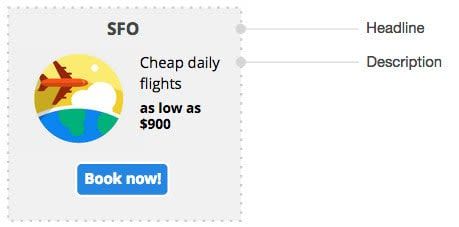
We created the capability to update fares in display ad copy as fare availability changes. The FareNetTM script, a proprietary snippet of code, is implemented on the Flights Results page in the airline booking engine.
Fare information displayed during the booking process is captured in a database along with the site edition and relevant currency. Through airWire, the lowest eligible fares are sent to AdWords business feeds, allowing fares to be inserted dynamically into ad copy using ad customizers.
Currently, we can build multiple business feeds simultaneously regardless of language or market combination.
Goals
Our goals in building dynamic price insertion in Display ad copy are:
- Generate the necessary assets (campaigns and business feeds) to launch Dynamic Display Remarketing campaigns.
- Prices are updated automatically as fare availability changes for each route.
How Does Dynamic Display Remarketing Work? The User Path
Step 1: Cookies
A remarketing tag on the airline’s website supports display advertising on GDN for visitors who previously viewed eligible flight itineraries while browsing the airline’s website.
Google AdWords receives location, browser language settings, and the searched route when a booking process is not completed (e.g. Flight Results page).
Step 2: Business Feed
Google AdWords matches the relevant business feed and campaign based on location and language and finds the corresponding route and price in the feed.
The fare in the business feed comes from airWire based on business rules agreed upon by each client (e.g. the lowest fare available within the next 90 days). Therefore, the fare displayed may differ from the fare shown during the original search, it may be lower.
Step 3: Ad Creation
The ad is created dynamically based on eligible route and fare information associated with the remarketing feed.
Ads may be displayed across devices based on Google’s cross-device advertising functionality during the cookie window period.
How to Set up for Dynamic Display Remarketing with Prices
Step 1: Remarketing Tag
Add the dynamic remarketing tag to all pages where origin and destination airport codes can be captured for searches that did not result in a completed booking.
- Each step of the booking engine
- Route / Destination pages
- Offer Pages
Best Practice: Implement the AdWords MCC Remarketing tag through Google Tag Manager (GTM).
Dynamic Values
*Required
**Optional
Reference Google AdWords support article for more information.
Remarketing lists are created based on eligible site activity captured by the tag.
These lists group eligible site activity by criteria such as membership duration and booking funnel stage. The audience grouping framework, for example, could look like:
Membership duration
- 1-3 days
- 4-30 days
- 30-90 days
Steps in the booking funnel
- Flight Results
- Itinerary
- Passenger Details
- Payment
Organizing remarketing audiences by time frame and booking funnel stage allows campaign optimization and bidding to be performed at a more granular level.
Step 2: Account and Campaign set up
Account: One dedicated account for Dynamic Display Remarketing campaigns
Campaigns: Each campaign is geo-targeted to a specific geography and language.
Linking of the campaigns with the corresponding business feed needs to be done manually in the Settings tab of the AdWords interface.
Step 3: Business Feed
Automatically create a business feed for each language and market through the AdWords API that includes bookable routes, fares, and relevant currencies available on the website. Fares are automatically updated via airWire as fare availability changes.
The fare-display logic can be configured, for example to show the lowest fare available within the next 90 days.
Note: AdWords limits allow for each account to hold 100 feeds, with 5,000,000 feed items each.
- Currency setting: This setting determines whether the currencies displayed in the ad copy is based on point of origin or point of sale
- Point of Origin: to be used by airlines advertising prices based on where the searched flight is departing from.
- Example: User based in the United States searching for a flight from Mexico City to Rio de Janeiro will see ads in MXN pesos.
- Point of Origin: to be used by airlines advertising prices based on where the searched flight is departing from.
- Point of Sale: is to be chosen by airlines advertising prices in the currency from where the user is searching for a flight.
- Example: User based in the United States searching for a flight from Mexico City to Rio de Janeiro will see ads in USD Dollars.
Step 4: Dynamic Ads
Ads are created and updated dynamically based on previously searched itineraries.
Ads are populated with information from the feed and delivered through GDN remarketing campaigns.
Headline: The character limit for headlines is 25 characters. Ideally, the headline includes the route, or at minimum the destination.:
- Long headline: {origin} to {destination}
- Example: Mexico City to Rio de Janeiro
- Short headline: to {destination}
- Example: To Rio de Janeiro
Landing Page: Specify the landing page for the ads. Preferably, the ad links directly to the booking engine, a relevant route page, a destination page, or the home page.
Image URLs: Create a database containing destinations in the route network and their image URLs for use in Business Feeds. Updates are only required when a new destination is added to the network.
Best Practices
Avoid Showing Non-Competitive Prices
Setting a ceiling price per currency (USD, MXN, COP and BRL) will make sure only competitive prices are displayed in the ads. Whenever a route’s lowest fare exceeds the ceiling price, that route will be excluded from remarketing ads.
Create Different Audiences and Optimize Based on Performance
When launching dynamic remarketing campaigns, the strategy is to reach eligible remarketing audiences, expand impressions, and improve booking completion rates. After a test period, implement audience bid modifiers to improve campaign performance.
Implement Correct Google Tag Manager (“GTM”) Tracking
After obtaining the required data, create a data layer or custom event with a Dynamic Remarketing structure. Then create a Dynamic Remarketing Tag in GTM that captures the required campaign variables.